How to Use OmniRoute with Claude Code to Automate Short Video Editing on Windows
Muhammad Umar Malik10 min read
How to Use OmniRoute with Claude Code to Automate Short Video Editing on Windows
You can automate Reels, Shorts and TikTok editing on Windows with Claude Code, OmniRoute, FFmpeg and Whisper, but only as a pipeline: Claude Code writes and runs the scripts, FFmpeg edits, Whisper transcribes, OmniRoute supplies the AI model.
What this setup can and cannot do
OmniRoute is an open-source AI gateway, not a video editor. It gives tools like Claude Code one local endpoint (default port 20128) and routes requests to many AI providers. Claude Code cannot edit video by itself either. It writes scripts and runs commands, and FFmpeg does the actual editing.
| Task | Possible? | Tool that does it |
|---|---|---|
| Cut dead air, trim clips | Yes | FFmpeg, guided by Claude Code |
| 9:16 vertical export (1080x1920) | Yes | FFmpeg scale and crop |
| Auto captions (SRT) and burn-in | Yes | Whisper, then FFmpeg subtitles filter |
| Audio loudness balancing | Yes | FFmpeg loudnorm |
| Music and SFX mixing | Yes | FFmpeg amix |
| Word-by-word animated captions | Extra work | Whisper word timestamps and an ASS style |
| Face-tracking reframe, AI B-roll | Extra tools | Separate libraries or paid APIs |
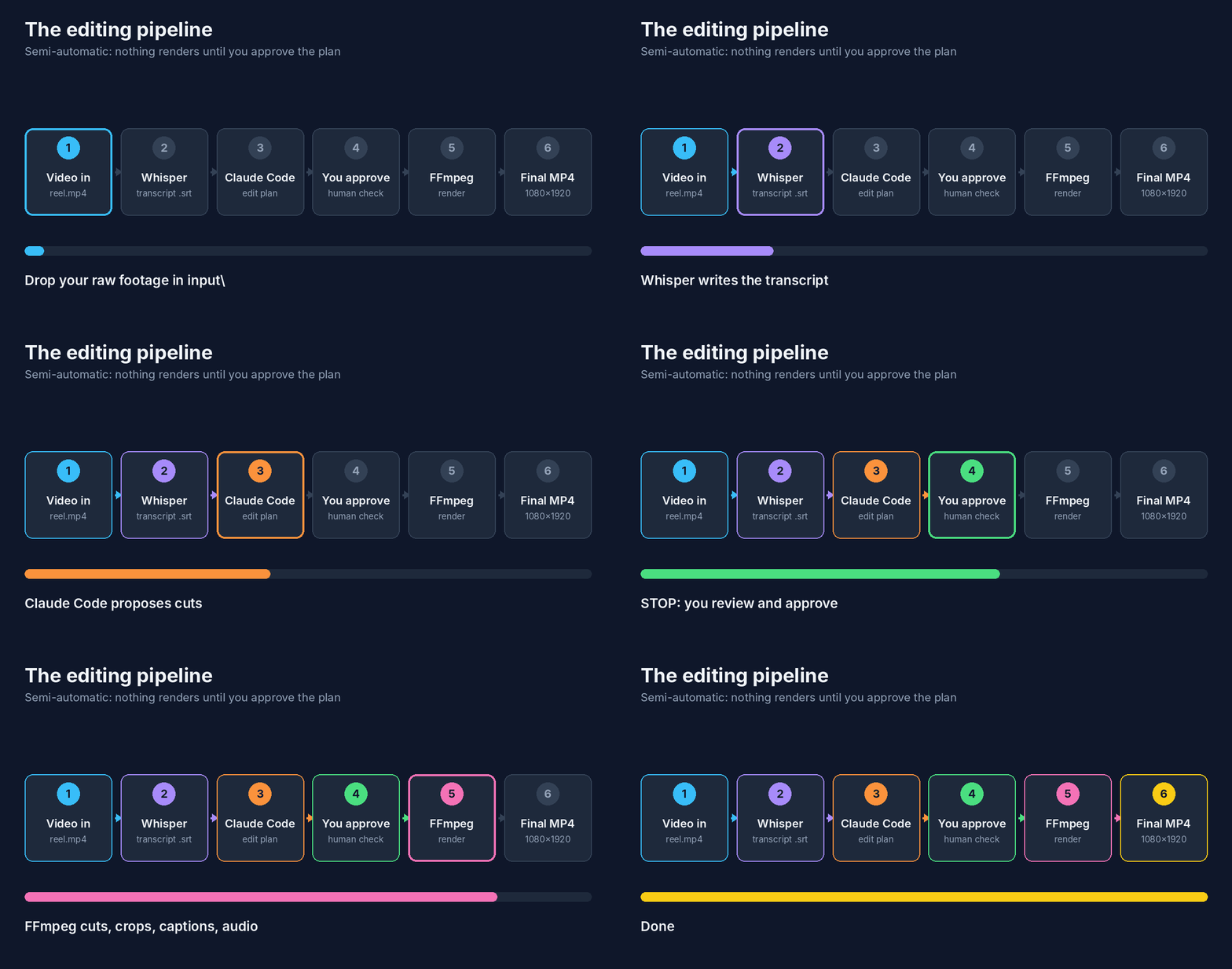
The pipeline is: video in, Whisper transcript, Claude Code edit plan, you approve, FFmpeg render, verified MP4 out. This guide targets Windows 10/11 and talking-head videos with a semi-automatic flow: you approve the plan before anything is rendered.
Step 01: Install Claude Code
Open PowerShell and run Anthropic's native installer:
irm https://claude.ai/install.ps1 | iex
Claude Code needs a paid Claude plan or API access; the free Claude.ai plan does not include it. Git for Windows is recommended but not required. Without it, Claude Code uses PowerShell as its shell tool. Node.js is not needed for the native installer, but you need it for OmniRoute in Step 04.
Step 02: Check Node.js, Git and Python
node --version
npm --version
git --version
py --version
claude --version
Every command should print a version. Whisper's repo says its code is expected to work on Python 3.8 to 3.11, so use Python 3.11 for this project. Newer Python versions may fail while installing Whisper's dependencies.
Step 03: Install FFmpeg
FFmpeg is the engine that does the editing.
winget install --id Gyan.FFmpeg -e
Close and reopen PowerShell, then check both tools:
ffmpeg -version
ffprobe -version
ffmpeg -filters | Select-String "subtitles|loudnorm|silencedetect|crop|scale"
If ffmpeg is not recognized, add the build's bin folder to your Windows PATH. Burning in captions needs a build with libass; the gyan.dev full build includes it. If subtitles is missing from the filter list, install the full build manually from gyan.dev.
Step 04: Install and start OmniRoute
npm install -g omniroute
omniroute
Per the project README, the server boots on http://localhost:20128. Open the dashboard there, connect a provider you are authorized to use, and create an API key. OmniRoute is a third-party open-source project. Check each provider's terms before routing a subscription through any gateway, and watch your provider's billing, because "free tier" limits change.
Step 05: Connect Claude Code to OmniRoute
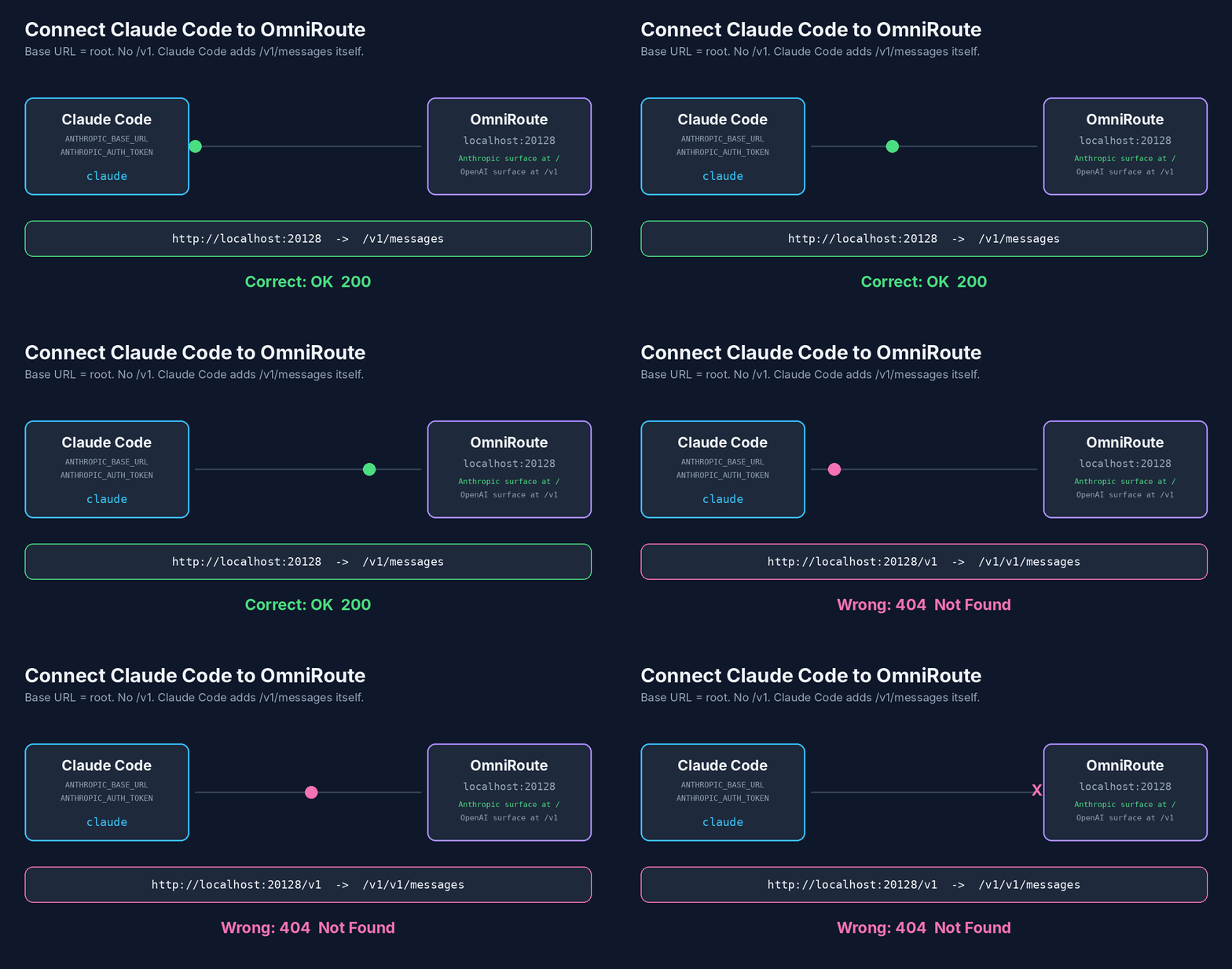
Claude Code works with a gateway only if the gateway exposes the Anthropic Messages format. OmniRoute serves the Anthropic surface at the root URL and the OpenAI surface under /v1, so for Claude Code the base URL has no /v1; Claude Code adds /v1/messages itself.
Option A (easiest): let OmniRoute launch Claude Code.
omniroute launch
This starts claude with ANTHROPIC_BASE_URL and ANTHROPIC_AUTH_TOKEN already set. The newer generic launcher does the same and lets you pick a model:
omniroute run claude --model <provider/model>
omniroute run claude --dry-run
Use --dry-run first to see what will be injected. You can also run omniroute setup-claude to write per-model profiles, then omniroute launch --profile <name>.
Option B: set the variables yourself, for the current PowerShell session only.
$env:ANTHROPIC_BASE_URL = "http://localhost:20128"
$env:ANTHROPIC_AUTH_TOKEN = "YOUR_OMNIROUTE_API_KEY"
claude
Inside Claude Code, run /status to confirm it is talking to your gateway, then send a small test request. Quality depends on the model you route to: Claude Code relies heavily on tool use, and weaker models may handle it badly. Never commit your key to a public repo.
Step 06: Create the project folder
mkdir short-video-editor
cd short-video-editor
mkdir input, output, assets, scripts, transcripts
Put raw footage in input. Final files go to output, and the originals are never overwritten.
Step 07: Set up Python and Whisper
py -3.11 -m venv .venv
.\.venv\Scripts\Activate.ps1
python -m pip install --upgrade pip
pip install -U openai-whisper
whisper --help
Whisper needs FFmpeg on PATH. If installation fails on tiktoken, the Whisper docs say you may need Rust installed. If PowerShell blocks the activation script, change the execution policy for your user only, not the whole machine.
Step 08: Transcribe the video
whisper .\input\reel.mp4 --model small --language English --output_format all --output_dir .\transcripts
For Urdu, use --language Urdu. Model sizes run from tiny to large. The default is turbo, which is fast but is not trained for translation. Use medium or large if you need non-English speech translated to English. Larger models need more VRAM (about 2 GB for small, 5 GB for medium, 10 GB for large) and run slower.
Open the generated reel.srt and fix names, numbers and mixed-language phrases before burning captions. Whisper's SRT is phrase-level. Word-by-word highlighted captions need word timestamps and a styled ASS file, which is a separate build step.
Step 09: Inspect the video and find silences
ffprobe -v error -select_streams v:0 -show_entries stream=width,height,r_frame_rate:format=duration -of default=noprint_wrappers=1 .\input\reel.mp4
Then detect pauses. FFmpeg's silencedetect defaults are a -60 dB threshold and 2 seconds, which is too lenient for speech. These starting values are a suggestion, so tune them to your room noise:
ffmpeg -i .\input\reel.mp4 -af "silencedetect=noise=-30dB:d=0.5" -f null - 2>&1 | Select-String "silence_"
The output lists silence_start and silence_end times. Treat them as suggestions, not cuts. Some pauses are part of your delivery.
Step 10: Cut, then convert to vertical 9:16
Cut first, then re-run Whisper on the cut file so captions match the final timeline. FFmpeg's wiki warns that the subtitles filter reads its file separately, so combining it with -ss seeking makes subtitles start from the top of the file.
ffmpeg -ss 00:00:03.2 -to 00:00:41.0 -i .\input\reel.mp4 -c:v libx264 -crf 18 -c:a aac .\output\reel_cut.mp4
Now make it vertical:
ffmpeg -i .\output\reel_cut.mp4 -vf "scale=1080:1920:force_original_aspect_ratio=increase,crop=1080:1920" -c:v libx264 -preset medium -crf 20 -c:a aac -b:a 192k .\output\reel_vertical.mp4
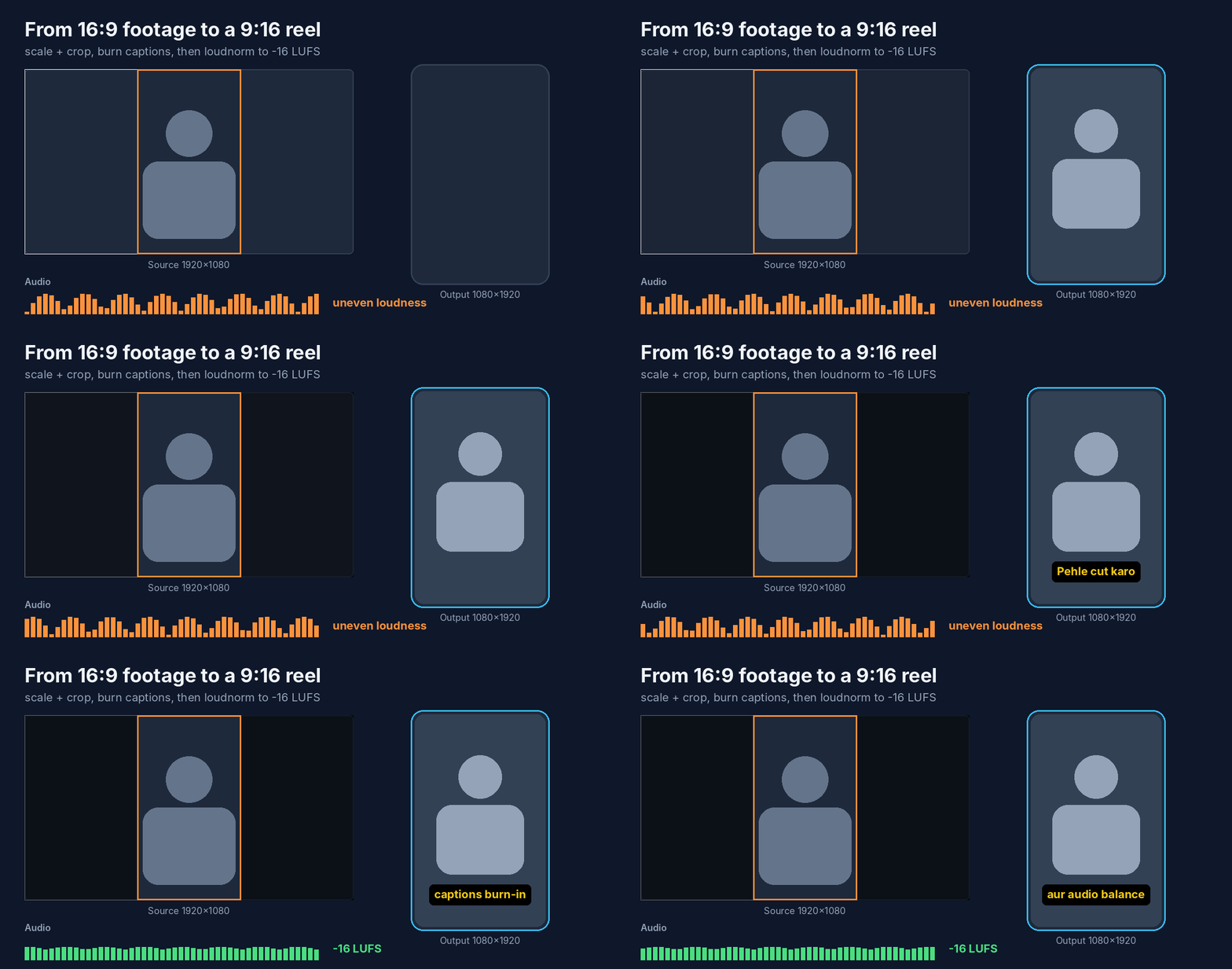
This is a centre crop. If your face sits off-centre, it will be cut. Adjust the crop's x offset, or use a blurred-background layout instead.
Step 11: Burn in captions
Run from the project root and keep subtitle paths relative, which avoids Windows drive-letter escaping problems. Transcribe reel_cut.mp4 first so transcripts\reel_cut.srt exists.
ffmpeg -i .\output\reel_cut.mp4 -vf "scale=1080:1920:force_original_aspect_ratio=increase,crop=1080:1920,subtitles=transcripts/reel_cut.srt:force_style='FontSize=16,Bold=1,Outline=2,Alignment=2,MarginV=180'" -c:v libx264 -crf 20 -c:a aac .\output\reel_captioned.mp4
The subtitles filter needs an FFmpeg build with libass, and Windows may need font paths set up for it. Keep captions inside the platform's safe zones, away from the bottom UI.
Step 12: Balance audio and add music
Single-pass loudnorm works in dynamic mode, which changes the audio's dynamics. Two passes give a precise, linear result. Pass one measures:
ffmpeg -i .\output\reel_captioned.mp4 -af "loudnorm=I=-16:TP=-1.5:LRA=11:print_format=json" -f null -
Copy the input_i, input_tp, input_lra, input_thresh and target_offset values into pass two:
ffmpeg -i .\output\reel_captioned.mp4 -af "loudnorm=I=-16:TP=-1.5:LRA=11:measured_I=-19.3:measured_TP=-3.1:measured_LRA=6.4:measured_thresh=-29.8:offset=0.5:linear=true" -c:v copy -c:a aac -b:a 192k .\output\reel_final.mp4
The numbers above are placeholders; use your own measurements. To add licensed background music at a quarter of the voice weight, mix with amix:
ffmpeg -i .\output\reel_final.mp4 -i .\assets\music.mp3 -filter_complex "amix=inputs=2:duration=first:weights='1 0.25':normalize=0" -c:v copy -c:a aac .\output\reel_with_music.mp4
Use only music and SFX you have a licence for.
Step 13: Give Claude Code one clear master prompt
Open Claude Code in your project folder (claude) and paste this. It keeps the run semi-automatic: Claude proposes, you approve.
You are my short-form video editing assistant. Project folder: this directory.
Input: input\reel.mp4. Write everything to output\ and transcripts\.

Rules:
1. Never overwrite or delete anything in input\.
2. Run ffprobe first and report resolution, duration and frame rate.
3. Run silencedetect (noise=-30dB, d=0.5) and list the pauses. Do NOT cut yet.
4. Transcribe with Whisper (model small, language English) and show me the SRT.
5. Propose a cut list with timestamps and reasons. Wait for my approval.
6. After approval: cut, crop to 1080x1920, burn captions, two-pass loudnorm to -16 LUFS.
7. Verify the final file with ffprobe (1080x1920, audio present) and report the path.
8. Show every ffmpeg command before running it. Stop and ask if anything is unclear.
Step 14: Approve in rounds
A good flow has three stops:
- Stop 1: transcript and cut list. Fix wrong words and remove cuts you don't want.
- Stop 2: a captioned preview. Check caption position, font size and face framing.
- Stop 3: the final audio-balanced export.
If a result is off, tell Claude exactly what to change ("move captions up 40 px") instead of restarting.
Step 15: Final export and checks
ffprobe -v error -select_streams v:0 -show_entries stream=width,height,codec_name -of default=noprint_wrappers=1 .\output\reel_final.mp4
Expect width=1080, height=1920, codec_name=h264. Then watch the full video once with headphones. Check that captions match the speech, audio is not clipped and no cut sounds abrupt.
Troubleshooting
| Problem | Likely cause | Fix |
|---|---|---|
| 401 Unauthorized in Claude Code | Wrong or missing key | Set ANTHROPIC_AUTH_TOKEN to your OmniRoute API key and restart the terminal |
| 404 Not Found | Extra /v1 in the base URL | Use http://localhost:20128 with no /v1. Claude Code appends /v1/messages itself |
| Connection refused | OmniRoute not running | Run omniroute launch and keep that window open |
ffmpeg is not recognized | PATH not refreshed | Close and reopen PowerShell, then run ffmpeg -version |
whisper install fails | Unsupported Python or missing build tools | Use Python 3.11 in a venv. Install Rust if tiktoken fails to build |
| Whisper is very slow | CPU only or model too big | Use small or base, or use a CUDA-enabled PyTorch build on an NVIDIA GPU |
| Subtitles filter error | FFmpeg built without libass | Check ffmpeg -filters for subtitles, or install the Gyan.FFmpeg build |
| Subtitle file not found | Windows path escaping | Run from the project root and use a relative path with forward slashes |
| Face cut off after crop | Centre crop | Change the crop x offset or use a blurred-background layout |
| Captions out of sync | Captions made from the uncut file | Re-run Whisper on the cut video |
| Claude Code runs wrong commands | Weak model for tool use | Switch to a model with strong tool use in OmniRoute |
FAQ
Is OmniRoute a video editor? No. It is an AI gateway. FFmpeg does the editing, Whisper does the transcription and Claude Code coordinates them.
Can I use the free Claude.ai plan? No. Claude Code needs a paid plan or API access. With OmniRoute you can route it to other providers, subject to their terms and billing.
Do I need Git for Windows? No. It is optional. Claude Code falls back to PowerShell.
Why Python 3.11? Whisper's README lists Python 3.8 to 3.11. Newer versions may hit install problems.
Which Whisper model should I use?
small is a good balance for clear speech. Use medium for harder audio. Note that turbo cannot translate.
Can it fully automate editing? Not safely. Cuts, framing and captions still need a human check, which is why this guide keeps an approval step.
Can it track faces or add AI B-roll? Not with this setup. Both need extra tools.
Sources
Checked October 2026. Re-check versions and flags before publishing.